This complete guide will show you how to install and use IPTV Smarters Expert on iPhone and iPad (iOS) using the Apple App Store.
If you’re looking for a simple way to set up IPTV Smarters Expert, enter your subscription details, and start streaming with your IPTV service, this tutorial covers everything step by step.
What Is IPTV Smarters Expert?
IPTV Smarters Expert is a powerful IPTV player that allows users to stream live TV, movies, and series using:
Xtream Codes login
M3U playlists
The IPTV Smarters Expert app itself does not provide channels. You must add your own IPTV subscription to start watching content.
What You Need to Get Started
To use IPTV Smarters Expert, simply enter your subscription details:
Username – provided with your subscription
Password – provided with your subscription
Host (Server URL) – provided with your subscription
Once these details are added, your channels and content will load automatically.
Step 1 – Install IPTV Smarters Expert on iPhone (iOS)
You can install the app directly from the Apple App Store.
1. Open the App Store on your iPhone or iPad.
2. In the search bar, type:
IPTV Smarters Expert
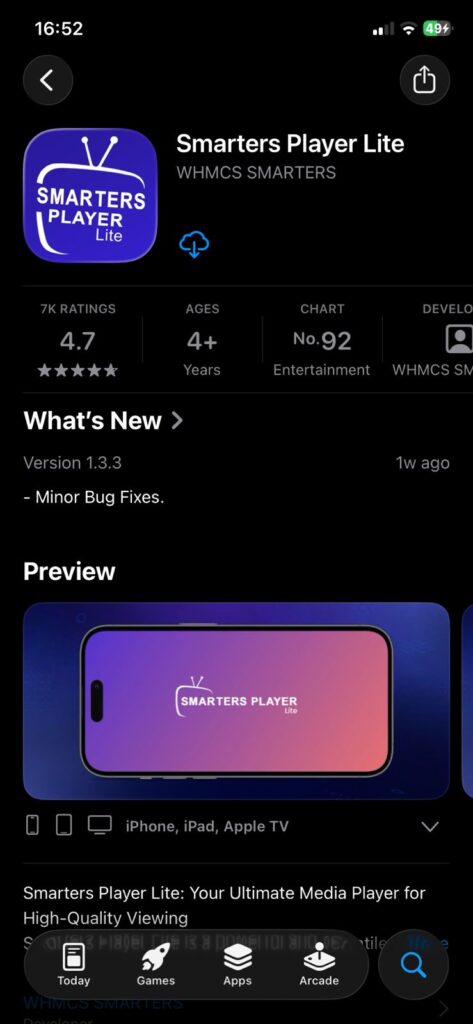
3. Select the app from the search results.
4. Tap Get to download the app.
5. Confirm the download using Face ID, Touch ID, or your Apple ID password.
6. Wait until the installation is complete.
How to Set Up IPTV Smarters Pro
1. Launch IPTV Smarters Pro.
2. Choose your device type:
Read the notice that Smarters Pro does not provide content and click Accept.
Choose your login method:
Option 1 – Xtream Codes API (Recommended)
1. Select Login with Xtream Codes API.
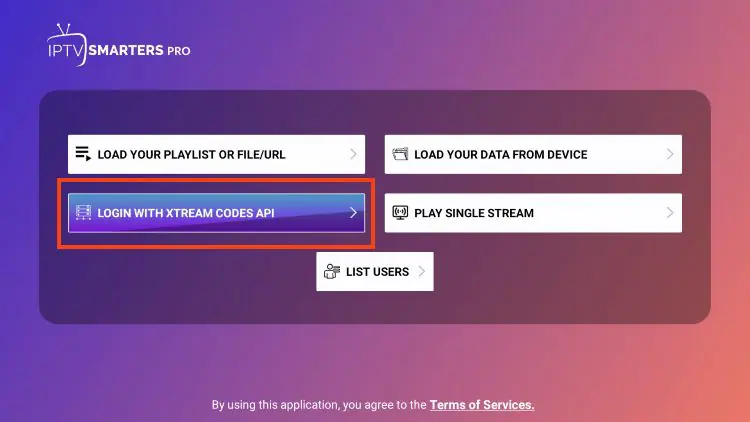
2. Enter:
Server URL
Username
Password
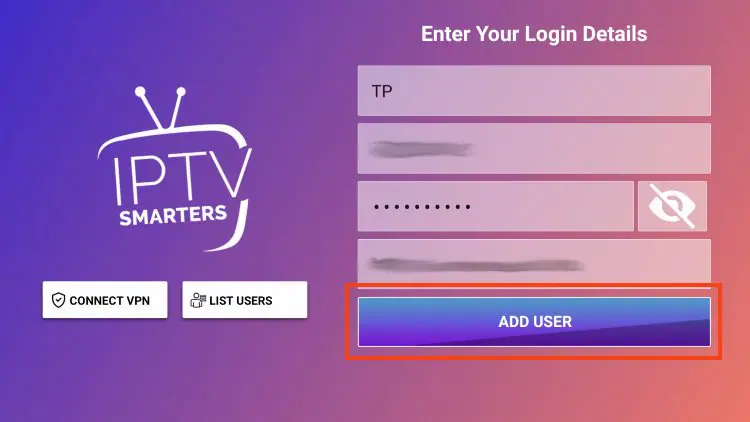
3. Click Add User and wait for the confirmation message.

Can I Use IPTV Smarters Pro on Other Devices?
Yes. Besides Android, IPTV Smarters Pro also works on:
- Smart TVs
- Android TV Boxes
- Fire TV Stick (via APK)
If you’re searching for IPTV Smarters Pro for Smart TVs or IPTV Smarters Pro on Firestick, the same activation method using MAC address applies.