Set Up IPTV on MAG Box – Quick Guide 2026

This guide shows you how to set up IPTV on MAG box devices using the Stalker Portal method.
It works for all MAG IPTV boxes, including MAG 254, MAG 256, MAG 322, MAG 524, and newer models.

Buttons

Step 1 – Send Your MAG IPTV Box Information

To activate IPTV on your MAG box, send us:
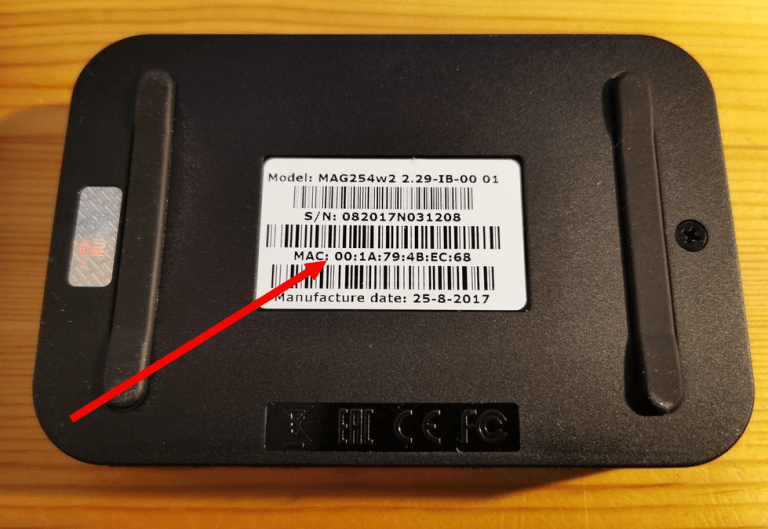
  • MAC Address of your MAG IPTV box

  • Order ID / Payment reference

  • Device model (MAG 254, MAG 256, MAG 322, etc.)

  • Connection type (WiFi or Ethernet)

Step 2 – Configure Portal on MAG Box

After you receive your IPTV portal URL, follow these steps:
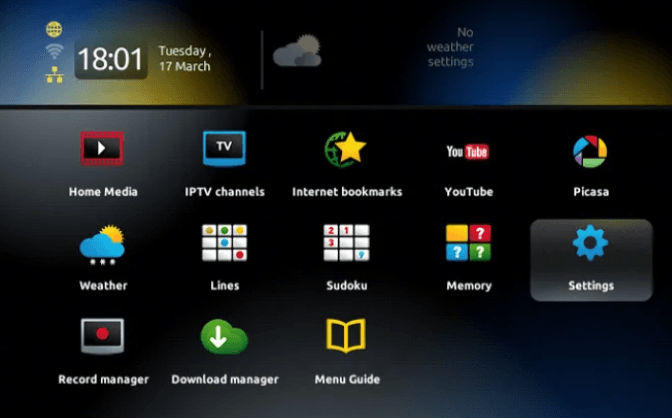
  1. Go to Settings

  2. Select System Settings

  3. Choose Servers

  4. Open Portals

  5. Enter:

    • Portal URL (must start with http://)

    • Portal name (any name)

  6. Press OK to save

This connects your MAG IPTV box to your IPTV service.

Step 3 – Complete IPTV Setup on MAG Box

  1. Check all settings

  2. Exit to the main menu

  3. Restart your MAG box

    • Power off

    • Wait 30 seconds

    • Power on again

Your IPTV on MAG box is now ready.

Tips for Better MAG IPTV Streaming

  • Use Ethernet for best performance

  • Keep a stable internet connection

  • Make sure your MAG IPTV box is updated

  • Keep good ventilation for the device

Troubleshooting MAG IPTV

If IPTV does not load:

  • Check your internet connection

  • Verify your MAC address

  • Make sure the portal URL starts with http://

If you see “Authorization Failed”:

  • Re-check all details

  • Turn off VPN if active

  • Contact support if the issue continues

Request a Free IPTV Trial

Enter your email to request a free IPTV trial.
You will receive a confirmation email to verify your address before we send your trial details.

Newsletter Form (#3)
Support
Live Chat Online

Support & Free Trial

Contact us for technical support
or to request a free IPTV trial.

WhatsApp Support
Fast Support
Telegram Support
Fast Support
Live Chat
Fast Support
Email Support
Slower Response